Timeline
The lanes of the timeline and what each holds.
The timeline sits under the video. It shows everything in your edit over time.
Lanes
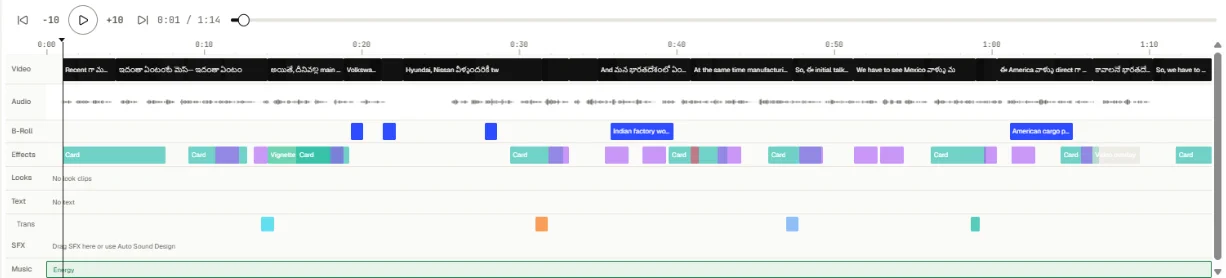
From top to bottom. A lane only shows when it holds something.
| Lane | What it holds |
|---|---|
| Video | Your kept segments. Gaps are cuts. |
| Audio | The sound wave |
| B-Roll | Footage and pictures over your video |
| Effects | Zooms, cards, lower thirds, emoji and other effects |
| Looks | Colour looks |
| Text | Text you added |
| (transitions) | Marks where a transition sits on a cut |
| SFX | Sound effects |
| Music | Background music |
| Clips | Short clips Toast found for social posts |
A story video opened in the editor also has a Scenes lane.
Working with the timeline
- Click anywhere to move the playhead there.
- Click an item to select it. Its settings open in the Properties tab.
- Drag an item to move it, or drag its edges to change its length.
- Press Delete to remove a selected effect or look.
- Use the play controls under the video, or press Space to play and pause. With the progress bar selected, the left and right arrow keys jump 5 seconds.