Ready to post
Post text for each platform and a thumbnail, made when your talking-head or story video is exported.
When your talking-head or story video is exported, the export screen shows Ready to post under it: A title, description and hashtags for each platform, and a thumbnail.
Post text
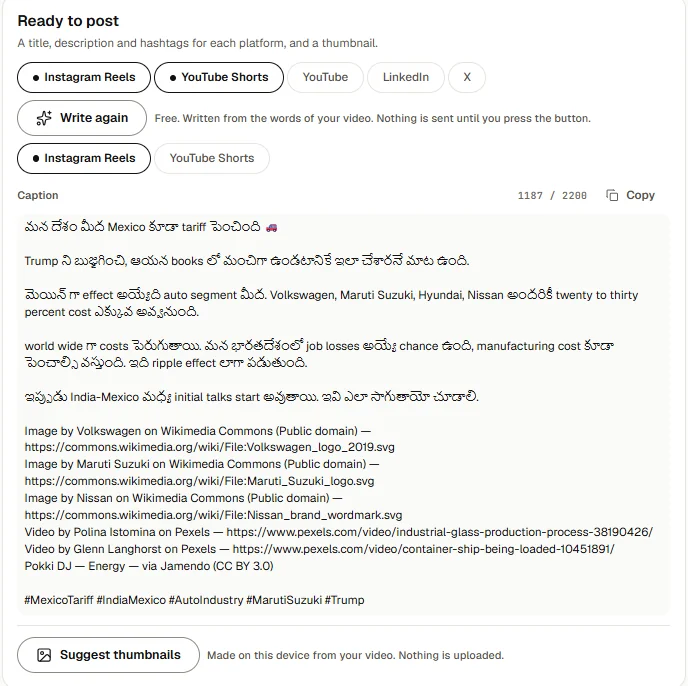
- Tick the platforms you post to: Instagram Reels, YouTube Shorts, YouTube, LinkedIn and X. A tall video starts with Instagram Reels and YouTube Shorts ticked; a wide one with YouTube and LinkedIn.
- Press Write post text.
- Toast writes the text for each platform you ticked. If you ticked more than one, press a platform's name to see its text.
- Press Copy beside what you need: Copy title, Copy for the description, caption or post (with its hashtags), and Copy tags where the platform has tags. Paste them where you post the video.
Each text ends with the credits your video needs: who made the photos, footage and music Toast used, and a line saying AI made part of the video when it did. They come before the hashtags, so they are in what you copy.
Each text fits its platform's limits. If Toast had to shorten one, it says Shortened to fit that platform's limit.
Not happy with it? Press Write again for a new version. You can tick other platforms first.
Post text is free. It is written from the words of your video: what you kept of what you said, or a story video's narration. Nothing is sent until you press the button. If your video has no words, Toast says This video has no words to write from.
If it fails, Toast says Toast could not write the post text just now. Try again.
Thumbnail

- Press Suggest thumbnails. Toast picks three good moments from your exported video. For a talking-head video, these are moments where your face is clear, your eyes are open and you look at the camera.
- Press the frame you like.
- Check the Title on the thumbnail. It starts as your video's title, and as the YouTube title once you have written post text. Type your own if you like.
- Toast draws the title on the frame, in your captions' font and colours, clear of your face, in two sizes: Reels and Shorts (1080×1920) and YouTube (1280×720). A wide video on the tall size goes whole across it, with the title above.
- Press Download under each size you need. It saves as a PNG.
The thumbnail is made on this device from your video. Nothing is uploaded.
If Toast cannot read frames from the video, it says so. Export the video again and try once more.
Animated videos have their own post kit, made on their page.