From screen recordings
Turn your screen recordings into an animated product demo or walkthrough.
You can make an animated video from screen recordings you made with Record. Recordings stay on your device until you choose to make a video from them.
Steps
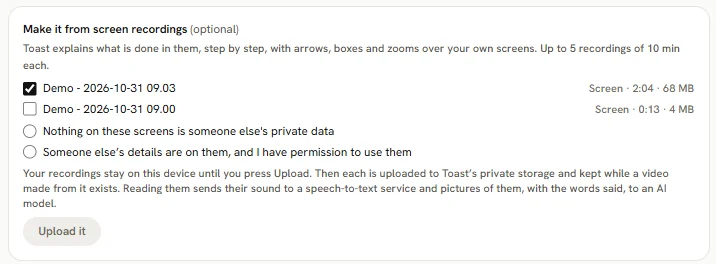
- Press A screen recording on the animated video start screen (or Make a video from it on a recording, then An animated product demo).
- Choose up to 5 recordings, each up to 10 minutes and 30 minutes in all.
- Tick one:
- Nothing on these screens is someone else's private data, or
- Someone else's details are on them, and I have permission to use them.
- Press Upload it (or Upload these N). The recordings are uploaded so Toast can read them.
- Press Read it (or Read them). It shows the price first; you are charged for the reading only if you make a video from these recordings. Toast finds each screen and what happens on it.
- For each screen pick Show, Blur or Leave out. Screens that look sensitive start as Leave out.
- Press Use these N screens. A video from screen recordings has no Look step or storyboard: you go straight to the Check step to make it.
Good to know
- The video is made only from the screens you keep, with the parts you chose to blur blurred.
- You can read recordings that you do not make a video from up to 3 times a day.
- Read the privacy page for how uploaded recordings are kept and deleted.