Make it premium
Toast's director picks what the viewer sees for each sentence, shows you the price, and makes it.
Being rolled out
Make it premium is not on every account yet. If you don't see the Make it premium button, it is not on for your account.
Your edit already has cuts, captions, B-roll, cards, effects and looks, and they stay included. Make it premium is the extra: Toast's director goes through your video sentence by sentence and adds full-screen graphics, big words, real photos and logos, stock footage, AI pictures and AI clips where they say more than you on camera. You see the plan and its price before anything is made.
Where to find it
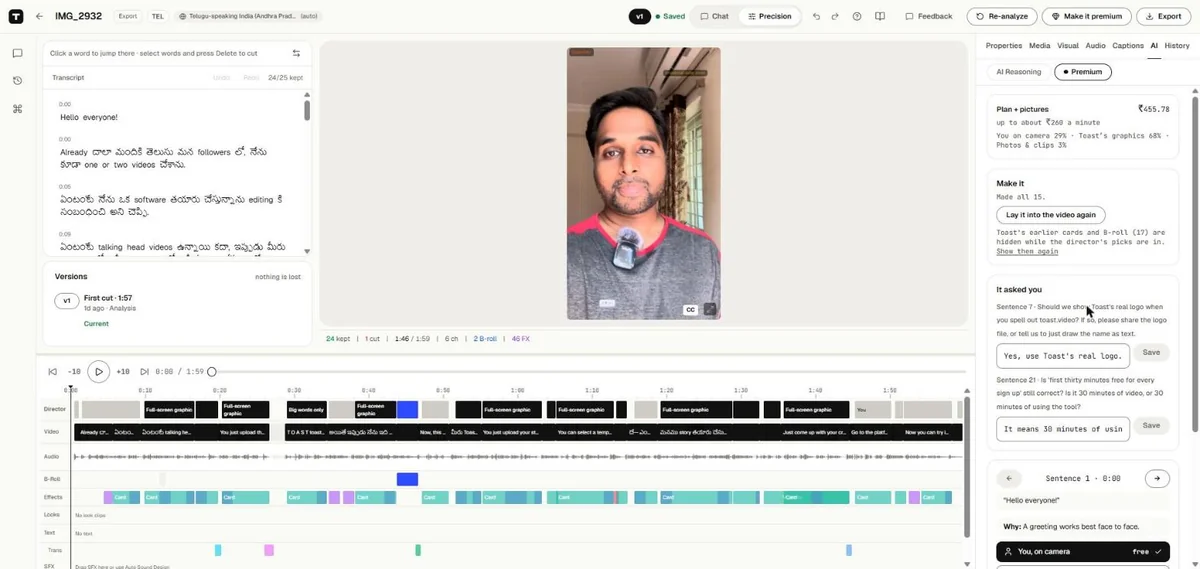
- Beside Export, at the top of the editor, in both Chat and Precision: press Make it premium.
- In Chat, once your first edit is ready, a card asks Make it premium? Press See the plan and price, or Not now to stop it asking for this video.
- In Precision, in the Inspector: AI › Premium.
The button and the card open the Premium tab, in Precision mode.
1. Plan what to show
Press Plan what to show. Toast reads what you say and, for each sentence, picks what the viewer sees (Planning each sentence…). Nothing is made yet and nothing is charged.
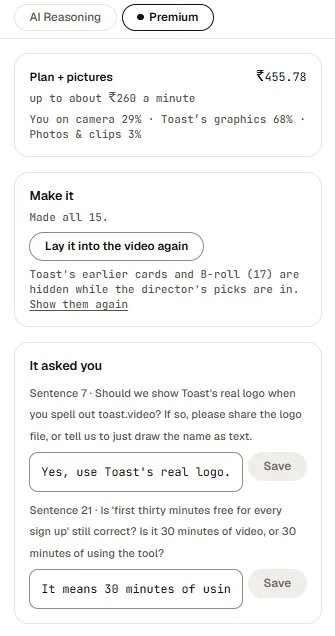
The plan shows its price at the top, and how much of the video is You on camera, Toast's graphics and Photos & clips.
On the timeline, a Director lane shows the plan: one block for each pick, grey where you are on camera, black where Toast draws a graphic, blue for photos and clips. Click a block to open that sentence.
If the director has a question for you, it is under It asked you. Type the answer and press Save.
2. Change what you like
Each sentence shows its words, its time, and Why the director picked what it did. Use the arrows to go from sentence to sentence. A long sentence can have more than one pick, each with its start time.
Under each pick, choose what the viewer sees. Each choice shows its price:
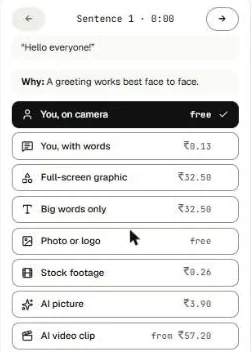
| Choice | What the viewer sees |
|---|---|
| You, on camera | You, as you are. Free. |
| You, with words | You, with the key words beside you. |
| Full-screen graphic | A graphic drawn for that sentence. |
| Big words only | The words themselves, large, filling the screen. |
| Photo or logo | A real photo of the person, or the company's logo. Free. |
| Stock footage | A stock video clip. |
| AI picture | A picture Toast draws. |
| AI video clip | A short clip Toast makes from a drawn picture. |
Under a pick, a line may say what it would show.
All the graphics in a video share one look. If you have a brand kit with colours and fonts, they are used.
The price updates as you change the plan. Your changes are kept: the director's pick is replaced by yours, and the sentence says You changed this from the director's pick.
3. Make it
Press Make it · ₹…. The button shows the price.
While it is made, the Premium tab shows what is being made and how long it usually takes, for example Making 5 graphics · usually about 15 minutes, the time so far, and the step it is on, such as Drawing graphic 3 of 5. You can keep editing or close the page; Toast keeps making it, and it is there when you come back. If it runs long, it says Taking longer than usual, still working.
When it is done, it says Made all N. If a piece could not be made, it lists it and says you were not charged for it. Press Make it again to try again.
If you change the plan after it is made, press Make it again to use the changes.
4. Lay it into the video
If the editor is open when it finishes, Toast lays it into your video by itself. If you came back later, press Lay it into the video again. Toast says what it laid in, for example Laid in 5 graphics, 3 cutaways and words beside you in 2 places.
While the director's picks are in your video, Toast's earlier cards and B-roll are hidden. Press Show them again to bring them back.
Then export as usual.
What it costs
Planning is free. Making it is priced before you press Make it, and the price is on the button.
- It costs up to about ₹260 a minute of video. A plan that would cost more says This plan costs more than the cap and lists the picks that would make it fit, for example an AI clip that becomes an AI picture. Press Step them down, or change picks yourself.
- You pay what it really costs, and nothing for a piece that is not made.
- As with any video, your wallet sets aside a little more than the price while it is made. You never pay more than that. See Pricing and wallet.
If your wallet is short, Toast says Your wallet cannot hold this price. Add money, then make it.