Animated videos
An AI agent writes, narrates and animates a video from an idea, a document, a website link or a screen recording.
An animated video is made by an AI agent. It writes the script, narrates it, animates every scene, then checks its own work before you see it.
Start from the Animated video card on Home, or type an idea or paste a link into the box on Home.
What are you starting from?
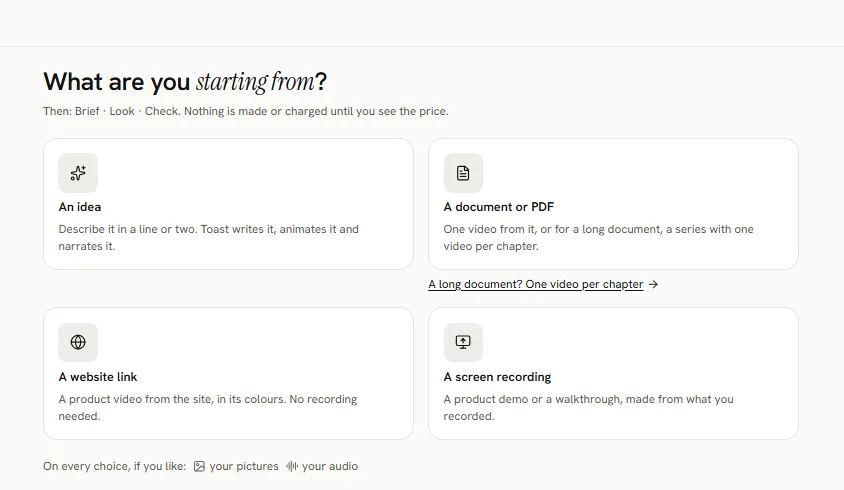
The first screen asks What are you starting from?
- An idea: describe the video in your own words.
- A document or PDF: a long document can become one video per chapter.
- A website link: Toast reads the site, or a public GitHub pull request.
- A screen recording: one or more of your recordings.
On every choice you can add your own pictures and your own audio.
The three steps
- Brief: what the video is about, its shape, length, voice and language.
- Look: let Toast pick a look, or see three looks first.
- Check: read the storyboard, change any words, then Make the video.
A video from screen recordings, or made to your own audio, skips the Look step and the storyboard and goes straight to Check.
Nothing is made or charged until you see the price and press Make.
Making a video usually takes 45 to 90 minutes. You can leave the page. Then you can download it, change a scene, make other shapes, and get a thumbnail or a post kit.
Find your animated videos any time under All Projects, with the Animated videos filter.