Sound effects and music
Auto sound design, the sound effects library, and background music.
Both are in Precision mode under Audio.
Sound FX
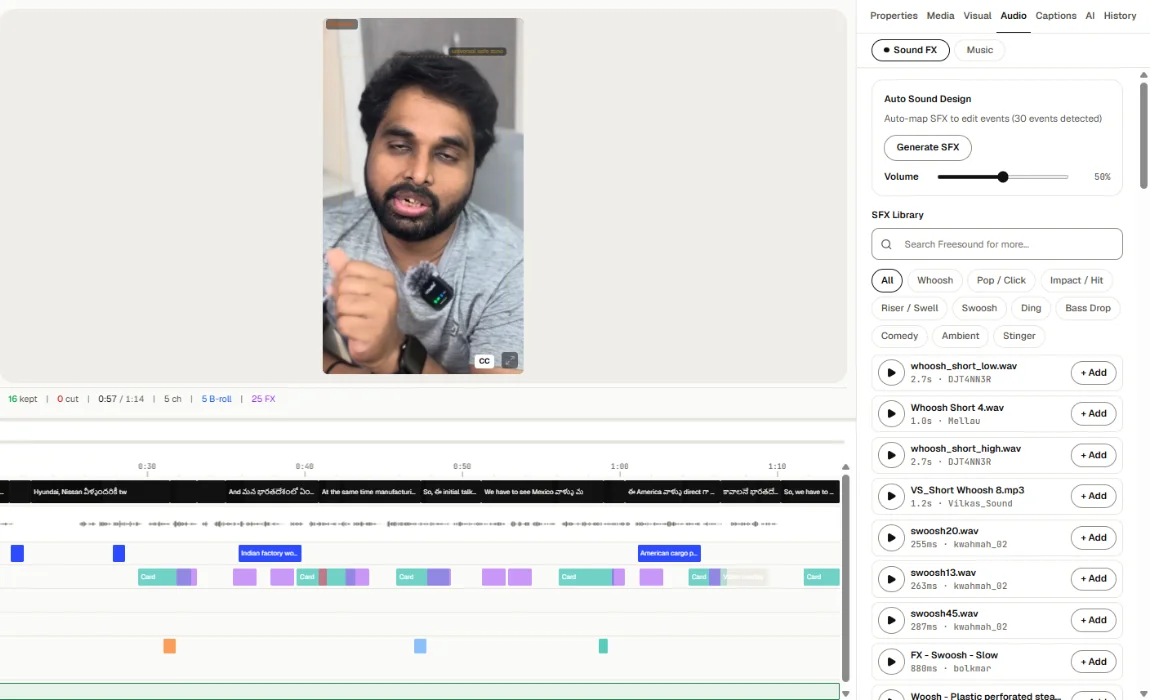
- Auto Sound Design adds sound effects to match the edit.
- SFX Library lets you search for a sound (Search Freesound for more...) and add it.
- Set the Volume.
Sound effects appear on the SFX lane.
Music
- If you chose Auto-suggest in setup, Toast picks licensed music that fits.
- The Music panel has two tabs: Upload (press Upload Music to use your own) and Jamendo Library (search licensed music).
- Volume, Fade in and Fade out set how it starts and ends.
- Auto-Ducking lowers the music while you speak: set the volume During speech and During silence, and how fast it fades down and up.
If you chose No music in setup, Re-analyze won't add music. Add a track in the Music panel instead.
Licensed music may need a credit line. Toast lists it on the export page.