Account
Brand kit
Your business name, contact details, logo, colours and fonts, saved once for your videos.
Your brand kit is saved once and used by every video that asks for it:
- the end card of property videos (your name, logo and how to reach you)
- an animated video made in my brand (your name, website, colours, fonts and logo)
Where to edit it
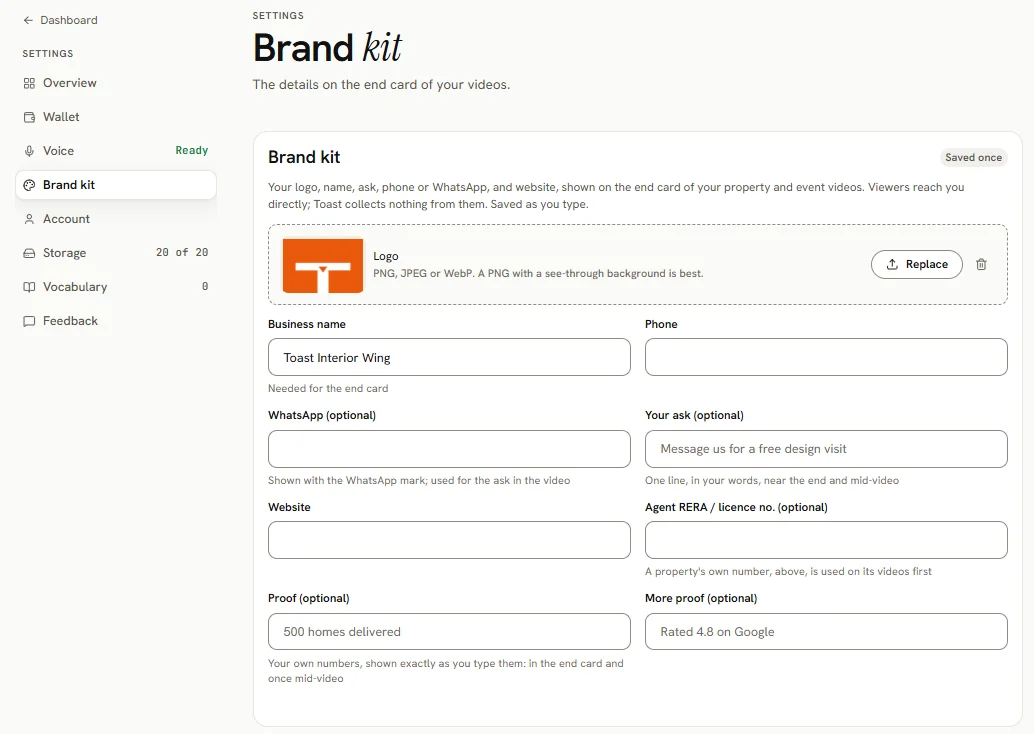
- In a property's Details step, the Brand kit card (marked Saved once). It saves as you type.
- In a property's Make step, under Your end card, when something is missing.
- In the animated video brief, under Make it in my brand.
All three edit the same kit.
Fields
| Field | Notes |
|---|---|
| Logo | PNG, JPEG or WebP, up to 8 MB. A see-through background is best. SVG is not accepted: export it as a PNG of 1000 px or more. |
| Business name | Needed for the end card. With no name, no end card is drawn. |
| Phone | |
| WhatsApp (optional) | Shown with a chat icon |
| Your ask (optional) | Up to 60 characters, for example "Message us for a free design visit" |
| Website | |
| Agent RERA / licence no. (optional) | Used when a property has no number of its own |
| Proof (optional), More proof (optional) | Up to 2 lines of 40 characters, for example "500 homes delivered" |
| Colours | Up to 6, main colour first (in the animated video brief, and Brand colours in a property's end card) |
| Fonts (optional) | Up to 3 font names (animated videos) |
Everything is drawn exactly as you type it.
After a change
A finished video keeps the kit it was made with. Make the video again to use the new kit.